Vocal pitch monitor
See every note you sing
Sing into your microphone and see your pitch as a line over the notes. A meter shows when you are flat or sharp, so you can correct it as you sing.
No account needed. Your voice stays on your device.
Loading the pitch graph…
- 1Press Listen and allow the microphone.
- 2Sing a note and hold it.
- 3Watch the line and the meter.
Your audio stays on your device. The graph listens only while it shows Listening, and it never records or uploads your voice.
Before you sing with a tanpura
First, set the noise level
On speakers, the microphone hears the tanpura and the harmonium as well as your voice, and the graph draws them even while you are silent. Noise level tells the graph which sounds to ignore. The graph sets it for you.
- Press Listen. The graph shows Stay silent as it starts listening, and again each time you change the tanpura's or the harmonium's volume.
- Stay silent for about two seconds. The graph listens to the room and sets Noise level just above what it hears.
- Sing when it shows Now sing! Your voice draws the line, and the tanpura doesn't.
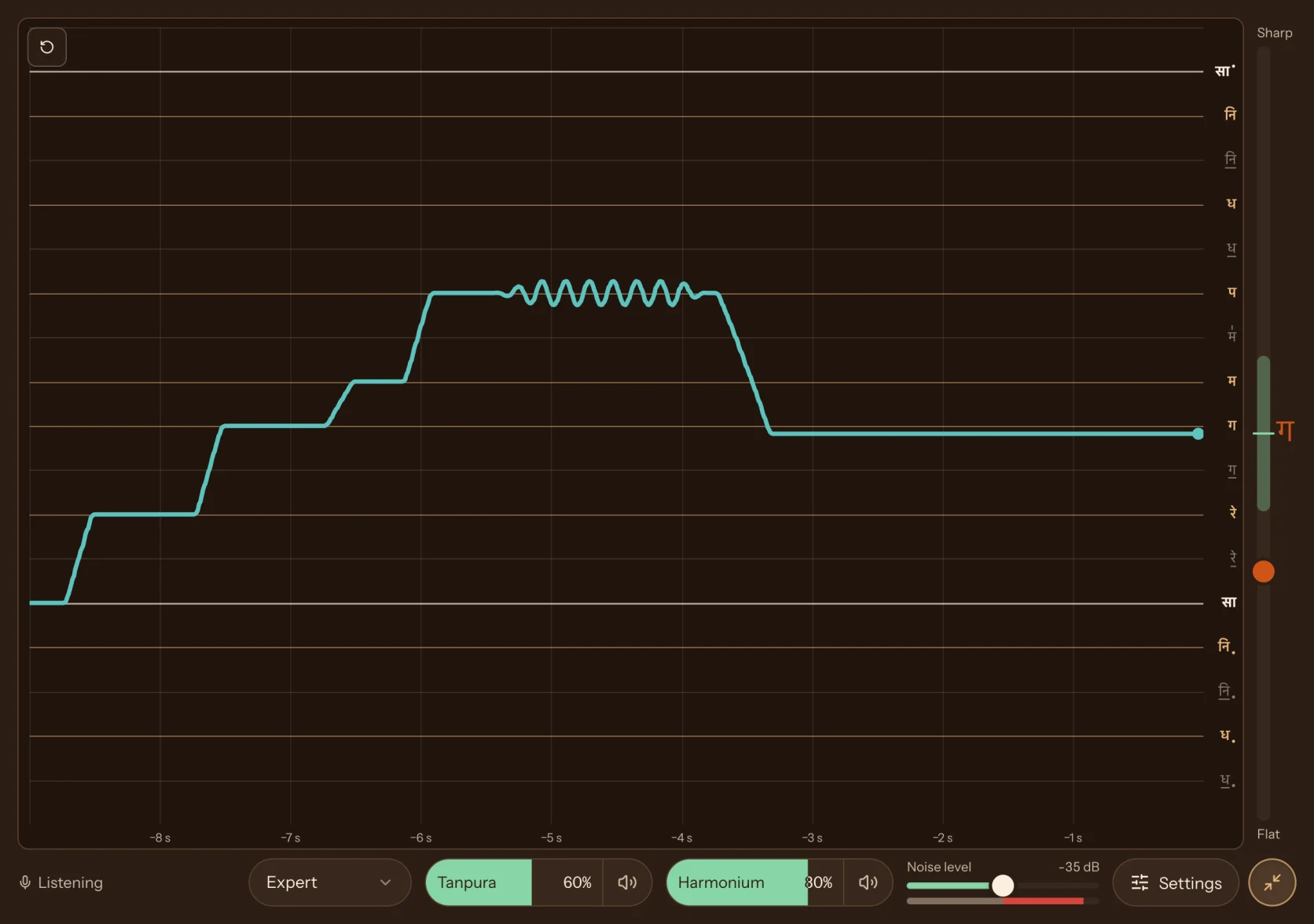
Noise level sits below the graph, between Harmonium and Settings. Red on its bar means sound above the noise level. If the line still moves while you are silent, drag Noise level higher. If your voice stops showing, turn the tanpura or the harmonium down, or use headphones.
Read the graph
Your voice is the line
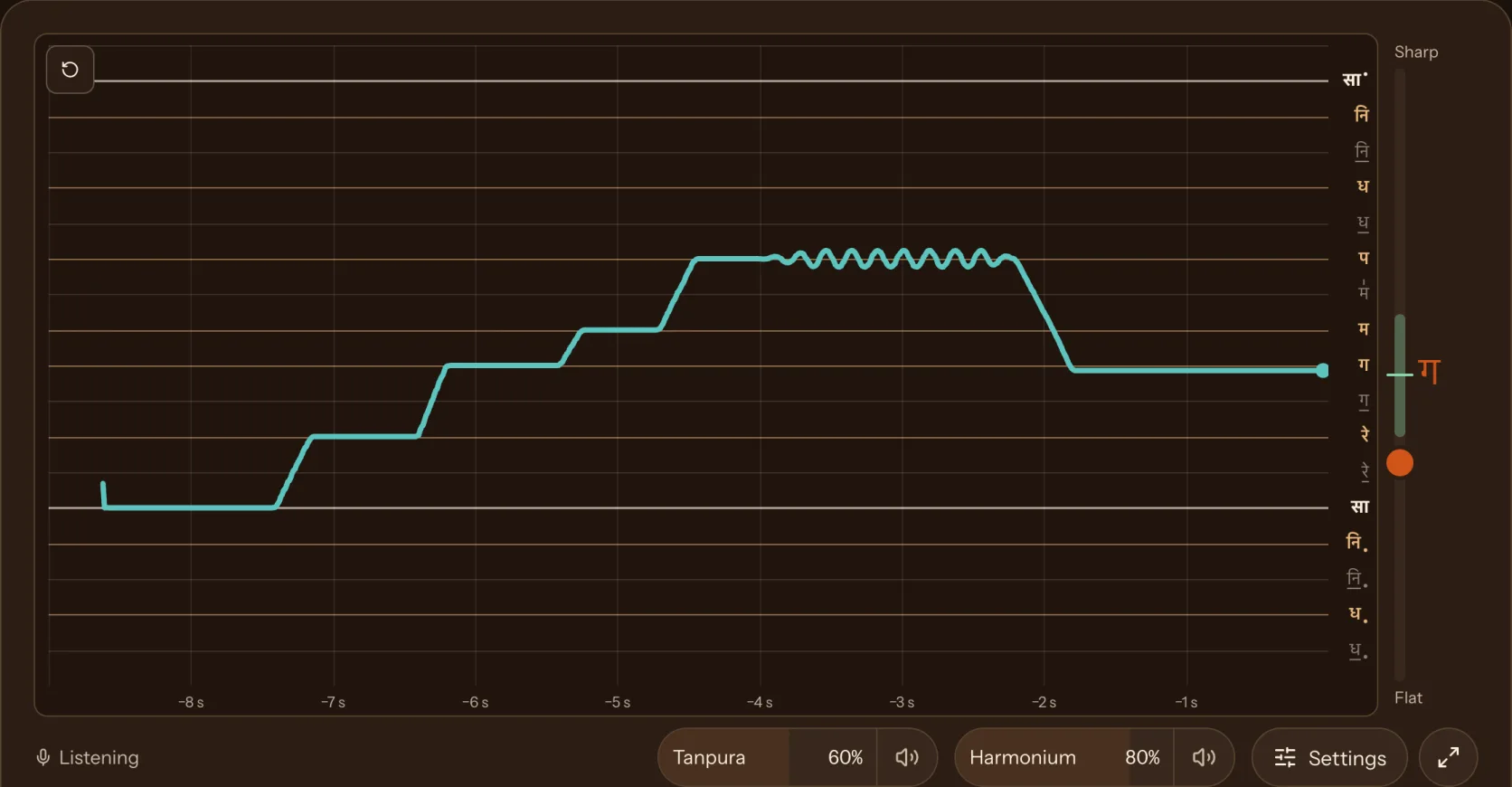
Time runs from left to right. Higher notes are higher on the graph.
Your voice
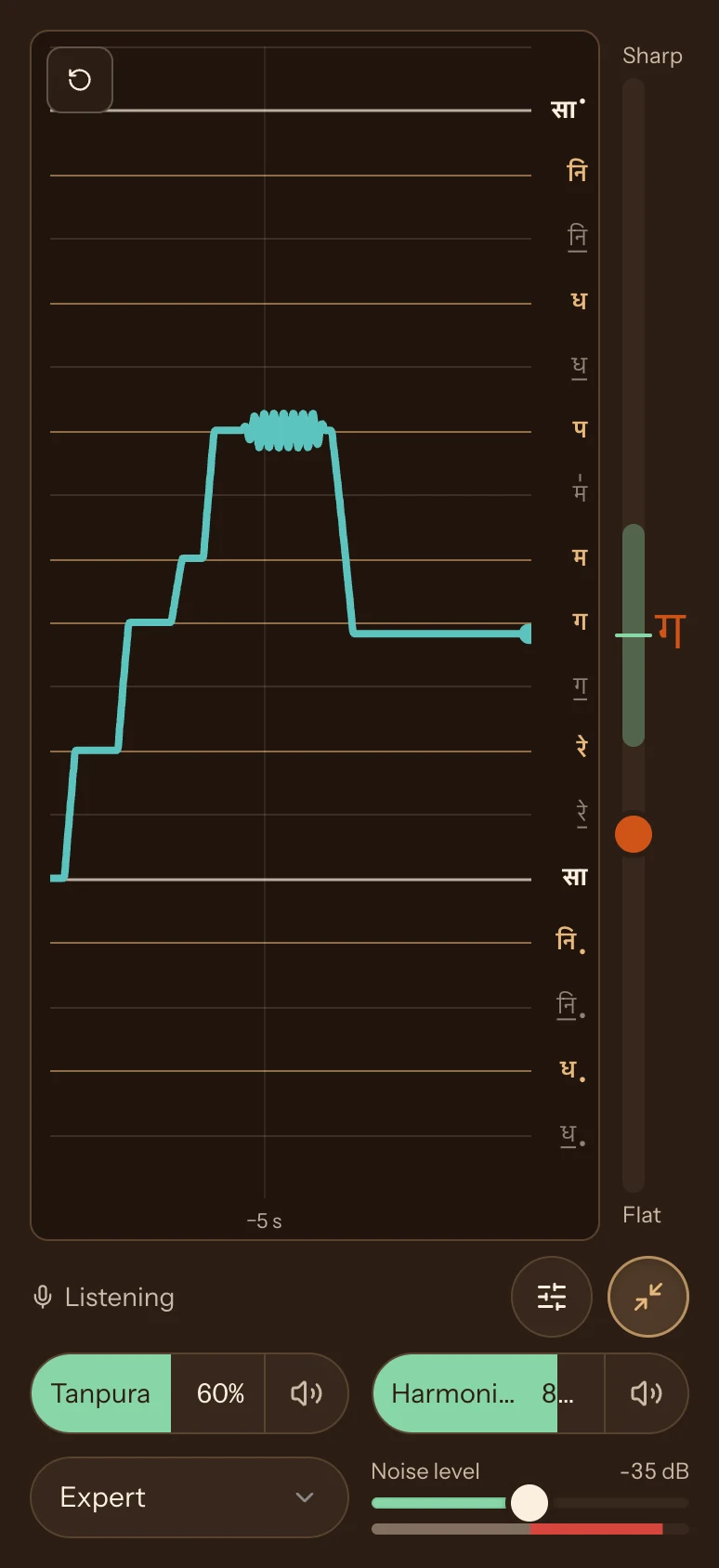
The line follows your pitch. A wavy line on one note is vibrato. Beginner level smooths small wobbles away, so choose Expert to see vibrato in full.
Sa or C
The brightest lines mark Sa in sargam, or C in Western names.
Note names
Each line is a note. The main notes are darker. Komal notes are underlined.
Now
The dot at the end of the line is what you sing now. Hold a note in tune and its line and name light up.

The meter
Flat or sharp, at a glance
The meter beside the graph runs from 50 cents flat at the bottom to 50 cents sharp at the top. A cent is one hundredth of a semitone.
- Marker: your pitch now, compared with the nearest note.
- Green band: within 10 cents of the note. The note name turns green here.
- Note name: the note you are singing. It changes only when your voice settles on a new note, so you can read it while you sing.
In this example the marker is below the band: Ga is about 14 cents flat.
Below the graph
Sing with a drone and a harmonium

-
Tanpura
Hear Sa while you sing
Drag or tap the Tanpura bar below the graph to play a recorded tanpura on your Sa, at the level you choose. Tap the speaker to mute it. Set Sa in Settings. The tanpura, the sargam names, and Harmonic tuning all count from it.
When you press Listen, and each time you change the tanpura's level, the graph asks you to stay silent while it sets Noise level.
-
Harmonium
A harmonium that follows you
Raise the Harmonium bar and it follows you, as a harmonium player follows a singer. When you settle on a note, it plays that note in tune a moment later. If you have drifted, you hear the difference.
It fades in gently and fades out after you stop. Vibrato around a note counts as holding that note.
Harmonium delay in Settings sets how long you hold a note before it joins in, from 50 to 500 ms.
-
Tuning
Standard or Harmonic tuning
Standard divides the octave into twelve equal semitones, as on a piano.
Harmonic places each note at a pure ratio to Sa, such as 3:2 for Pa and 5:4 for Ga. This is how a tanpura sounds and how many Hindustani singers tune. Ga, Dha, and Ni sit lower than on a piano, and the komal notes sit higher.
The note lines move, and the meter and the harmonium follow the tuning you choose.
Standard: the octave in twelve equal steps Harmonic and Standard on one octave
SaKomal ReReKomal GaGaMaTeevra MaPaKomal DhaDhaKomal NiNiUpper SaHarmonic tuning Standard tuning
Hear a sung major chord, Sa Ga Pa, in each
Standard tuningListen for a fast flutter. Harmonic tuningThe fast flutter is gone, and the chord sounds smoother. -
Settings
Everything else is in Settings
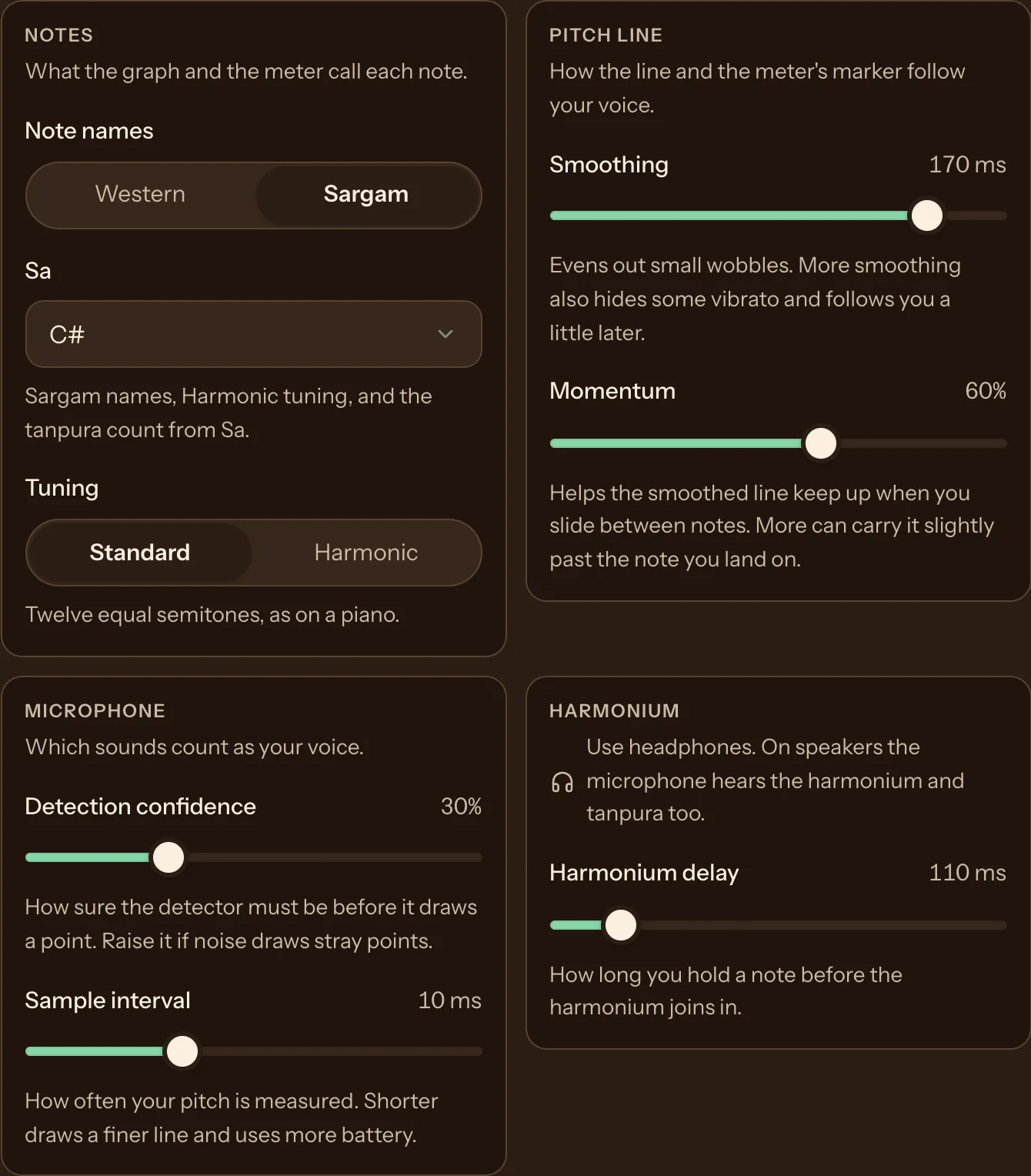
Settings open below the graph, so you can change them while you sing and watch the result.
- Notes
- Western or sargam names, your Sa, and Standard or Harmonic tuning.
- Pitch line
- Smoothing evens out small wobbles in the line and the meter. Momentum helps the smoothed line keep up when you slide between notes. The menu below the graph, Beginner, Intermediate, or Expert, sets both at once: Beginner smooths the most, and Expert shows every movement.
- Microphone
- How sure the detector must be before it draws a point, and how often your pitch is measured (every 5 to 40 ms).
- Harmonium
- How long you hold a note before the harmonium joins in.
Your note, pitch line, and harmonium choices are saved in this browser.
-
Maximize
Fill the screen
Drag the bar under the graph to make it taller or shorter. Press Maximize to give the graph the whole window. On a phone, the graph fills the screen. Press Restore or Esc to go back.
The graph keeps the last three minutes. Drag to scroll back, pinch or Ctrl-scroll to zoom, and choose Now to return to the live edge. Tap the graph to pause.
Tips
Get a clean line
- Check the noise level
- The graph sets Noise level when you press Listen and when you change the tanpura or the harmonium. If the line still moves while you are silent, drag Noise level, below the graph, higher until the red part of its bar disappears.
- Sing on vowels
- Vowels have a clear pitch. Breaths and consonants such as s and t don't, so the line breaks there.
- Hold each note
- Give each note a second or two. The note name and the harmonium wait for your voice to settle.
Questions
Frequently asked questions
Is the vocal pitch graph free?
Yes. We offer it to every singer at no cost, and it needs no account.
Does it record or upload my voice?
No. Your browser measures your pitch on your device. The graph listens only while it shows Listening, and it never records or uploads your voice.
Is this a sur detector or swar meter?
Yes. It detects the sur, or swar, you sing and names it in sargam (Sa, Re, Ga) or in Western notes (C, D, E). The meter beside the graph shows how far you are from the note. A tool like this is also called a swar meter, a singing pitch detector, or a voice tuner.
How do I know if I am flat or sharp?
Look at the meter beside the graph. The marker sits above the centre line when you are sharp and below it when you are flat. The note name turns green when you are within 10 cents of the note.
What is a cent?
A cent is one hundredth of a semitone. The meter runs from 50 cents flat to 50 cents sharp, which is halfway to the next note on each side.
Should I choose Standard or Harmonic tuning?
Choose Standard to match a piano, a keyboard, or most recorded music. Choose Harmonic to match a tanpura and the way many Hindustani singers tune, with each note at a pure ratio to Sa.
Can I see note names in sargam?
Yes. Open Settings, choose Sargam, and set Sa to your tonic. Komal notes are underlined, and teevra Ma has a mark above it.
Why does the line move when I am not singing?
The microphone hears sound in the room, including the tanpura and the harmonium from your speakers. When you press Listen, and each time you change their volume, the graph asks you to stay silent and sets Noise level for you. If the line still moves, drag Noise level, below the graph, higher until the red part of its bar disappears while you are silent.
Does it work on a phone?
Yes. Open this page in your phone's browser and allow the microphone. Press Maximize to fill the screen with the graph.
Practice songs with your pitch on screen.
Add a song you want to learn. Ragafied plays it in your key and at your speed, one phrase at a time, with a graph of the singer's pitch beside yours.